
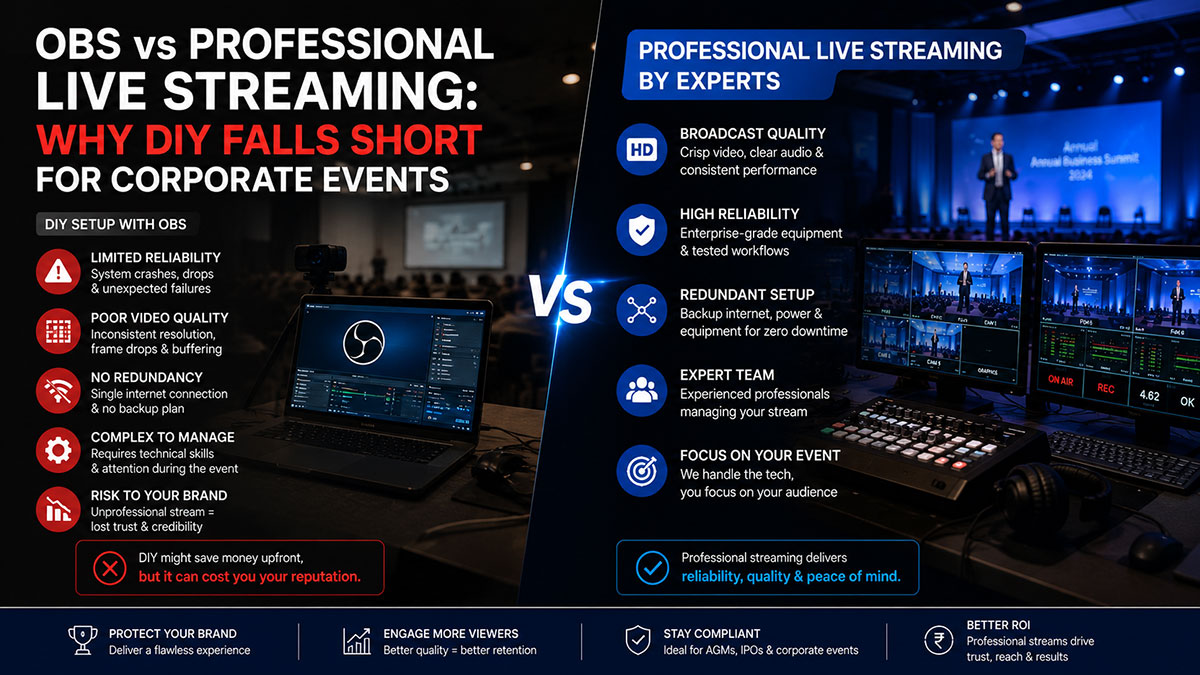
Open Broadcaster Software, better known as OBS Studio, is a remarkable piece of free technology. It powers thousands of gaming streams, YouTube channels, and casual webinars every single day. It is versatile, regularly updated, and supported by a large community. For personal use, it is outstanding.
For a corporate event — a company AGM, a national sales conference, a CEO address to 10,000 employees — OBS introduces risks that no event organiser should accept. This article examines where OBS genuinely excels, where it falls short, and why the gap between DIY streaming and professional managed services is far wider than most organisations realise.
What OBS Studio Does Well
OBS is well suited for: internal team communications and training webinars, podcast recordings with a live audience, small product demonstrations to existing customers, and social media lives where production standards are secondary to speed and authenticity.
The Real Risks of DIY Streaming for Corporate Events
Risk 1 — Hardware Dependency and Single Point of Failure
OBS runs on your computer. If that computer overheats, freezes, receives a Windows update, or suffers a driver conflict during your event, the stream ends. There is no redundancy, no failover system, and no backup path. A professional streaming setup runs on dedicated hardware with parallel encoding paths — if one encoder fails, another takes over automatically, and viewers experience nothing but seamless video.
Risk 2 — Latency and Audio Sync Problems
OBS’s encoding is handled by your CPU or GPU. Under load — multiple camera inputs, screen captures, overlays, and graphics — encoding performance degrades. The result is dropped frames, increasing latency, and audio-video synchronisation failures. Professional hardware encoders from Teradek, LiveU, and Matrox use dedicated ASICs for encoding, maintaining consistent performance regardless of how long the stream runs.
Risk 3 — No Professional Audio Management
OBS accepts audio inputs, but managing multiple microphone channels, eliminating room echo, applying compression, and maintaining consistent audio levels during a live event requires a dedicated audio engineer at a physical mixing desk. Poor audio quality is the single biggest complaint among corporate event attendees. It is also the most avoidable failure with the right team in place.
Risk 4 — No On-Site Technical Support
When you use OBS for a corporate event, you are your own technical support. Professional streaming teams assign a dedicated technical director, an audio engineer, and a streaming engineer to every event. Problems are solved before the audience notices them.
Risk 5 — No Adaptive Bitrate Delivery
OBS streams at a fixed bitrate to a single RTMP endpoint. Professional streaming platforms use adaptive bitrate (ABR) technology to automatically serve each viewer the best quality their connection can handle — from 1080p down to 360p — with seamless quality switches and zero buffering.
The Professional Alternative — What Managed Streaming Actually Delivers
Redundant Hardware and Connectivity
Professional setups use primary and backup encoders on independent internet connections — typically a primary fibre or wired broadband path and a secondary bonded cellular path. If the primary connection drops, the backup cuts in within seconds without interrupting the stream.
Broadcast-Quality Video Production
Where OBS users typically work with one camera and screen capture, a professional corporate streaming crew deploys multiple broadcast cameras, a hardware video switcher, professional lighting equipment, and a branded graphics package. The resulting stream looks like television, not a Zoom call.
Dedicated Content Delivery Network (CDN)
Professional streams are distributed through enterprise CDN platforms — Akamai, AWS CloudFront, or proprietary systems — that deliver low-latency video to viewers across India and internationally without the bottlenecks that affect consumer-grade streaming platforms.
Pre-Event Testing and Technical Rehearsal
Every professional streaming team conducts a full technical rehearsal before the event. This identifies bandwidth issues, audio feedback problems, camera positioning concerns, and graphics errors.
Making the Right Decision for Your Event
Use OBS when: the event is internal, low-stakes, and your team has streaming experience. The production quality expectation is ‘functional’ rather than ‘professional.’
Use a managed professional service when: the event involves external audiences, media, investors, or senior leadership. The brand is visible. The event runs for more than two hours. Audio and video quality directly reflect on the organisation’s credibility.
Frequently Asked Questions
Q: Is OBS Studio suitable for small corporate events?
For small internal events with technical operators on hand, OBS can work. For external-facing events, investor communications, or branded productions, professional services are strongly recommended.
Q: How much more does professional streaming cost compared to using OBS?
Professional corporate streaming starts at approximately Rs.25,000-Rs.50,000 for a half-day event depending on scale, camera count, and location. Compare this against the reputational cost of a failed stream in front of shareholders or clients.
Q: Can OBS handle multi-camera events?
OBS supports multiple camera inputs with adequate hardware, but switching between cameras in real time requires an operator who is simultaneously managing scenes, audio, graphics, and stream health — a challenging combination under live event pressure.
Q: What is RTMP and do professional services use it?
RTMP (Real-Time Messaging Protocol) is the protocol used to send a video stream to a streaming server. Professional services also use RTMP and SRT (Secure Reliable Transport), with SRT offering significantly better performance over unstable connections.
Q: Does Livebroadcasting.in offer a test stream before the event?
Yes. All professional event packages include a full technical rehearsal and connectivity test at the venue before the event date.
